
Instructions
Quick Start Guide: Get started editing your website with this easy-to-follow guide.
Support: Explore Webflow University's library for comprehensive video lessons on getting started.
- Getting Started with Webflow
- Lesson library
Useful links from Webflow University:
- Style manager
- Using Interactions
Before Publishing: Delete unused sections/pages, clean up CSS classes, clean up unused interactions and delete unused components.
Breakpoints: Check how your changes behave on different devices by clicking on the top bar of the viewport.
Backups: Restore previous versions from the Backups section in the left sidebar and clicking Settings in case of accidental deletions.
Editing Images and Text: Edit text by double-clicking on static content or use the CMS section for dynamic text. Replace images easily by clicking on them and choosing "Replace Image."
Dynamic Content (CMS): Learn how to manage and update dynamic content using the CMS, which instantly updates referenced content across pages.
Components: Utilize reusable components for efficient editing and consistency across layouts.
Base HTML Structure Rules (Webflow Attributes)
Use the following attributes in Webflow to activate animations automatically.
General Reveal Animation
data-anim-childUse on:
- Cms Single Rich Text
Box / Card Animation
data-anim-boxUse on:
- Cards
- Pricing items
- Service boxes
- Feature blocks
Section-Based Animation System
Add this attribute to a section wrapper:
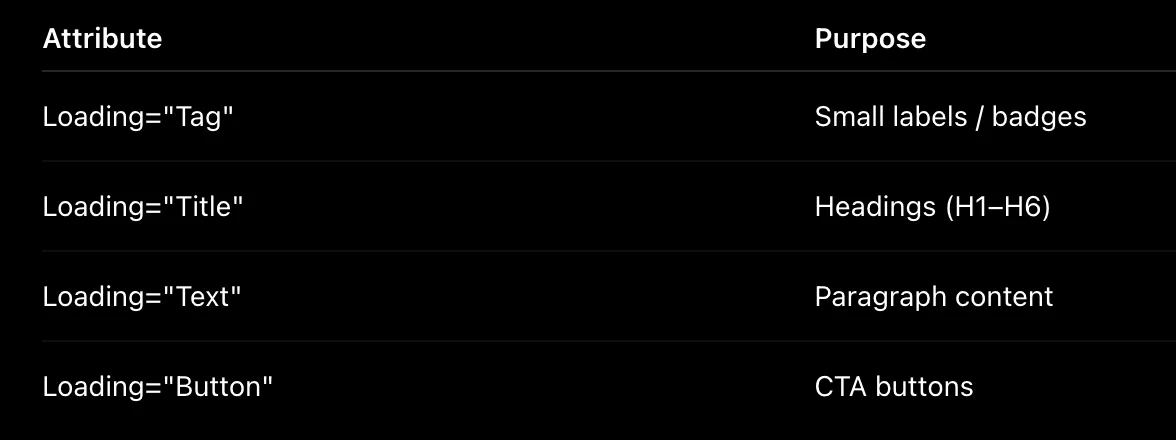
SectionInside it, use the following:
Animation Behavior Overview
Default animation settings:
- Y movement:
50px - Blur:
6px - Scale:
0.96 - Duration:
0.9s - Easing:
power3.out
All elements animate on scroll with smooth fade + motion effects.
Split Text Animation (GSAP SplitText)
Title Animation
Loading="Title"Behavior:
- Word-by-word animation
- Fade + blur reveal effect
- Smooth staggered entrance
Paragraph Animation
Loading="Text"Behavior:
- Word-by-word animation
- Slight delay for smoother flow
Vertical Marquee (Reviews)
Use class:
.single-review-wrapperFeatures:
- Infinite vertical scroll
- Auto duplicate items
- Hover pause support
- Alternating direction per column
Horizontal Marquee (Logos / Partners)
Use class:
.partners-marquee-itemsFeatures:
- Infinite vertical scroll
- Smooth continuous motion
- Hover pause support
- Alternating direction per row
Team Section Animation
Use class:
.team-wrapper
.single-team-wrap
Behavior:
- Staggered fade-up animation
- Smooth scroll reveal
Team Detail Slide Panel System
Open Trigger Button
.team-open-blockDetail Panel Wrapper
.team-details-wrapperClose Button
.team-close-icon- Full-screen slide-in panel
- Smooth GSAP transition
Performance Optimization Notes
- ScrollTrigger uses
once: truefor better performance - Lenis integrated with GSAP ticker